.jpg)
How to make a map
- Add your pictures. Drop them anywhere on the page, paste one, or click the box and choose files. JPEG, PNG, WebP and iPhone HEIC photos work.
- Choose the map: Edges, Line art or Depth (see the next section).
- Choose the size. Shorter side 512 px is the default. For edges, a slider sets how many edges are kept.
- Press the button. The map appears next to your picture. Edges and line art are instant. Depth runs a model in your browser, which is downloaded the first time.
- Download. Each map is a PNG named after the picture, such as
cat-edges.png,cat-lineart.pngorcat-depth.png. Use Download all as ZIP for a folder of them.
After the maps are made, changing the size, the slider or the colors updates them at once. For the depth map, changing the map type back and forth does not run the model again.
Which map to use
| Map | What it keeps | Use it to |
|---|---|---|
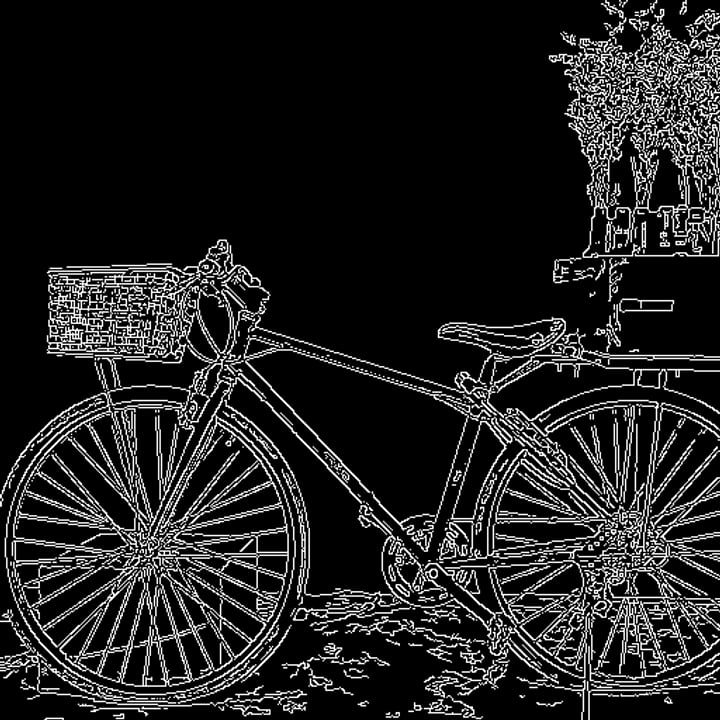
| Edges (Canny) | The outlines and strong edges of everything in the picture, as thin white lines on black | Keep the layout and shapes of a picture and change everything else, with a ControlNet Canny model |
| Line art | The dark lines of the picture, like a pen drawing of it | Turn a sketch or a photo into a cleaner drawing, with a ControlNet Lineart model |
| Depth | How near or far each part is, as a gray picture where near is light and far is dark | Keep the 3-D layout (what is in front of what) while the look changes, with a ControlNet Depth model |
Which model to load is up to your Stable Diffusion front end: the ControlNet model's name usually says "canny", "lineart" or "depth". The maps are what the standard preprocessors for those models make, so you can use this page instead of the preprocessor, or to prepare a whole folder in one go.
The size
ControlNet models work on pictures whose sides are multiples of 64, and ControlNet's own tools make the shorter side 512 pixels by default. This page does the same: the shorter side becomes the size you pick (512, 768 or 1024) and both sides are rounded to a multiple of 64, so a 1024 × 582 picture becomes 896 × 512. Choose the size you will generate at. Same size as the picture keeps the picture's own size, up to 16 megapixels (a bigger picture is made smaller). The edges depend on the size: a bigger picture has finer detail, so the same slider setting finds more edges.
Edges
The Edges map is Canny edge detection, the method every ControlNet front end uses (OpenCV's). It finds where the colors change sharply and draws those places as white lines on black. The slider sets two numbers, the low and high threshold: a place is an edge if the change is above the high number, or above the low number and joined to such an edge. The middle of the slider is the usual 100 and 200, the numbers used in the example on the ControlNet Canny model's page. Moving the slider to More keeps fainter edges and gives a busier map; Fewer keeps only the strongest. A photograph with a lot of texture usually wants Fewer, and a soft drawing wants More.
Line art
The Line art map needs no model. It blurs the picture, then looks for places where the picture is darker than its blurred self, which are lines, and scales the result so that faint lines show. It is the "standard" line art method from the controlnet_aux project. The result is white lines on black.
Colors
The box under Colors swaps black and white. It matters most for line art: the usual preprocessors give white lines on black, as this page does, but the model page of the ControlNet Lineart model describes its input as "usually black lines on a white background". If your Lineart model seems to ignore the lines, tick the box. The Canny model's page says white edges on a black background, so leave it unticked for edges. For depth the box makes far things light and near things dark, which you rarely want.
Depth
The depth map comes from Depth Anything V2 Small, a depth model with an Apache-2.0 license that guesses how far away each part of a single picture is. It is scaled the way ControlNet's own depth preprocessor does it: the farthest point becomes black, the nearest white. The model is about 94 MB, downloaded once and kept by your browser, and it takes about 6 seconds per picture on a laptop processor (measured on an Apple M1 Max that was busy with other work).
The ControlNet Depth model's page says it was not trained for one specific depth estimator, so a map from a different depth model than the usual MiDaS is fine, but the depth maps will not look identical to those from other tools. A depth model only guesses from the picture: expect mistakes on mirrors, glass, empty backgrounds, and flat drawings, where the shapes have no real depth to find. We use the full-size model file rather than the 26 MB compact one because the compact one matched it on photographs (correlation 0.999) but not on a flat-colored drawing (0.80).
How exact are the maps?
We compared this page with the code the ControlNet tools use, on our own test pictures:
- Edges: on identical pixels, our Canny matched OpenCV's exactly: 0 of 9.5 million pixels differed across 24 runs (8 pictures, 3 threshold pairs). Through the whole page, with the browser decoding the picture and our own resize, 99.98 to 100 percent of the pixels of four test maps were identical to OpenCV's.
- Resizing: the page shrinks pictures by area averaging and enlarges them with a Lanczos filter, as ControlNet's helper does; our results were within 1 level (of 255) of OpenCV's resize.
- Line art: within 1 level of the reference method on identical pixels, and on average 0.00 to 0.04 levels apart through the whole page.
- Depth: matched the same model run natively with a correlation of 0.9999 or better on three photographs and 0.993 on the drawing.
What this page does not make
ControlNet has other maps, such as human pose, segmentation, normal and soft edge or scribble maps. Each needs its own model, and this page makes only the three above. The original normal map, for one, depends on the exact depth numbers of the model it was designed for, so we did not offer an imitation.
Privacy
The maps are made in this tab. For what the site collects, see our privacy policy.
Frequently asked questions
What size should I choose?
The size you will generate at. 512 pixels on the shorter side suits Stable Diffusion 1.5 models, which were trained at that size; larger models take larger maps, such as 1024. ControlNet expects sides that are multiples of 64, so the page rounds them.
Why does my edge map look messy?
Because the picture has a lot of fine texture or noise. Move the slider toward Fewer, or make the map at a smaller size, which also removes fine detail. A clean, simple picture gives a clean edge map.
Do I need to invert the map?
Usually not. Edges should be white on black, as the Canny model expects. For line art it depends on your setup: white on black is what the usual preprocessors give, and if the lines seem to be ignored, tick the box for black lines on white.
Is this the same as the preprocessors in my Stable Diffusion UI?
For edges and line art, yes: they use the same Canny and line art methods, and our results matched them in our tests. For depth, it uses a different depth model than the common MiDaS one, so the map looks different, and the ControlNet Depth model is said to work with different depth estimators.
Does it make pose or normal maps?
No. Those need other models, and this page only makes edges, line art and depth.