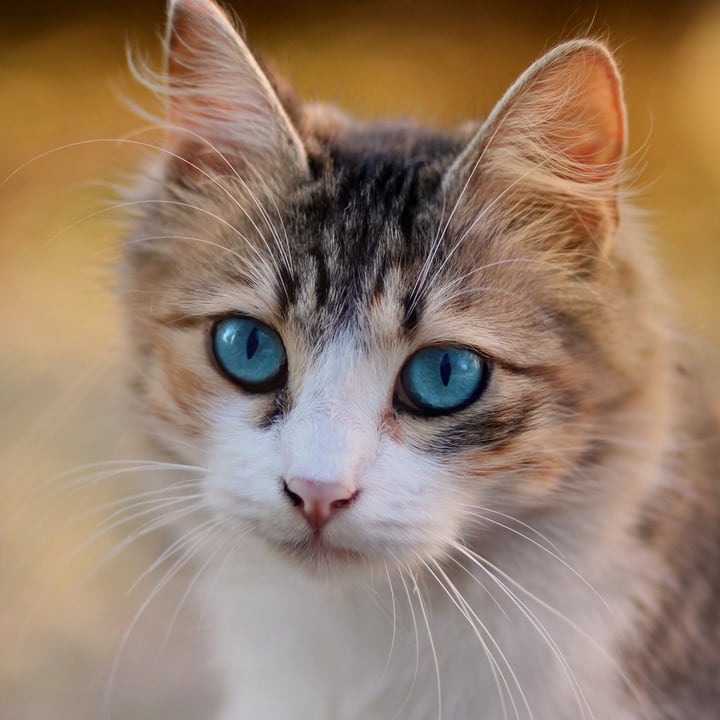
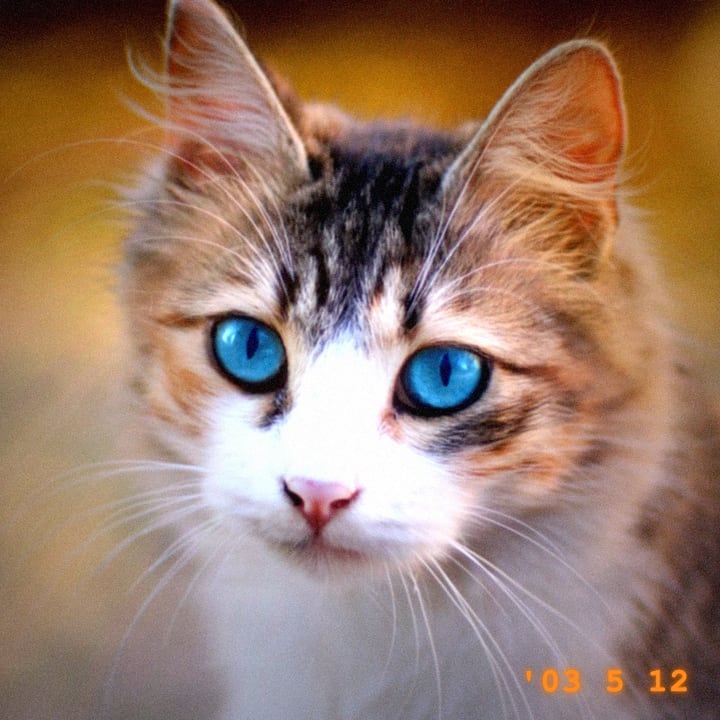

How to give a photo a retro camera look
- Add your photos. Drop one or many anywhere on the page, paste one, or click the box to choose files. Phone photos, including iPhone HEIC, work too.
- Choose a look. Y2K digicam is already chosen. The preview shows the first photo straight away, and the arrows let you check the others. Show the original flips between the two.
- Adjust it. The five sliders (flash glare, dark corners, grain, softness and colors) start at the look's own values. Choosing a look again puts them back.
- Set the date and the frame. The orange date can show the day your photo was taken, today, or any text you type. The Polaroid frame can be switched on for any look.
- Press Make the retro photo to make the files at the photos' full size, then download each one, or all of them as a ZIP.
Your original files are never changed. Each result is named after its photo with -retro added.
The four looks
| Look | What it does | Light in the middle and the corners | Grain |
|---|---|---|---|
| Y2K digicam | A hard flash on a small sensor: a bright middle, dark corners, strong saturation and contrast, a cool tint, a glow around highlights, a little color fringing at the sides, an orange date stamp. | 1.44 times in the middle, 0.67 times in the corners | Medium |
| Disposable film | Warm, grainy and faded: lifted blacks, a warm tint, a weaker flash, and an orange light leak that creeps in from one edge. | 1.25 times in the middle, 0.66 times in the corners | Strong |
| Polaroid | Soft and a little washed out, with a warm cast, in a white instant-film frame with a wider bottom edge and an optional caption. | 1.11 times in the middle, 0.80 times in the corners | Light |
| Camcorder | A home-video still: the softest look, scan lines, stronger color smear at the sides, a white date and a red REC dot. | Even in the middle, 0.69 times in the corners | Strong |
The light figures are the gain applied before the color curve, at each look's own settings. A gain above 1 in the middle is what makes a flash look blown out: bright areas run out of room and turn white.
What the sliders do
| Slider | What it changes |
|---|---|
| Flash glare | How much brighter the middle of the picture is than its edges, as if a flash lit the middle. At 0 there is no flash at all. |
| Dark corners | How much darker the corners are. The two sliders together shape the light: flash up with corners down is the compact-camera look. |
| Grain | The strength of the noise. It is stronger in the shadows than in the highlights, and part of it is colored. The grains scale with the picture, so a big photo does not end up with dust-fine grain. |
| Softness | A blur of up to 0.45 percent of the picture's shorter side: the slightly soft picture of a small sensor and a cheap lens. |
| Colors | From faded (left) to punchy (right). The middle is the look as designed: moving right raises contrast and saturation and lowers the faded blacks, moving left does the opposite. |
The date stamp
The stamp is drawn on the picture, in the lower right corner, in your browser's monospace font (it is not a real seven-segment display font). It has three settings:
- The date of the photo. The page reads the day the photo was taken from the data inside the file, the same reader the Image Metadata Viewer uses. If the photo has no date in it, for example because it was saved by a messaging app, today's date is used, and the line under the preview says so.
- My own text. Up to 24 characters.
- None.
The digicam and disposable looks write the date the way early cameras did, such as '03 5 12. The camcorder writes MAY. 12 2003 in white, with a red REC dot at the top left.
The Polaroid frame
The frame is a border drawn around the picture: 5 percent of the longer side on the top, left and right, and 20 percent at the bottom, in an off-white. A caption of up to 40 characters goes in the wide bottom edge, in a handwriting-style font that your device provides, and shrinks to fit. The finished file is bigger than the photo by the width of the frame.
How it works, and what it is not
It is a stack of plain image effects, with no model and no artificial intelligence: a soft blur, a light gain that falls off from the middle (the flash) and darkens the corners, a color tint, contrast, saturation and faded blacks, a glow added around the brightest areas, a small shift of red and blue in opposite directions toward the sides, random grain, an optional light leak and optional scan lines. We checked every step against a separate implementation in Python on a real photo: the results agree to within one level of 255.
That means two things worth knowing. It is an approximation: it does not copy the sensor or lens of any particular camera, and a real photo from those cameras has quirks that are not in here. And it is repeatable: the grain is made from a seed taken from the file's name and size, so the same photo with the same settings always gives the same file, and the preview matches what you save.
Size, speed and limits
- Speed. The preview of a 900-pixel picture takes about 0.2 seconds, which is why the sliders feel live. A 12-megapixel photo takes about four seconds from pressing the button to the saved file on a busy laptop (about two of them are the effect itself; the rest is opening and saving the picture). We did not measure phones.
- Size. Pictures keep their own size, except for the frame. A picture over 40 megapixels or over 16,384 pixels on a side is refused with a message.
- File size. Grain is detail that a JPEG cannot squeeze, so the saved file is bigger than the original at the same quality. In our test at quality 90 and 900 pixels, the Y2K look made files 1.2 to 1.8 times as big, the disposable and camcorder looks 1.5 to 2.3 times, and the Polaroid look 0.9 to 1.3 times. Lower the quality slider or the grain to make it smaller.
- See-through pictures. A picture with a transparent background is put on white first, because the effects need real colors.
Where the work happens
- The effect is made inside this tab. There is no model to download, and your files on disk are never changed or deleted.
- For what this site collects and keeps, see our privacy policy.
Frequently asked questions
How do I make a photo look like it was taken on a Y2K digital camera?
Add the photo and leave the look on Y2K digicam. It gives the photo a bright middle and dark corners, like an on-camera flash, stronger colors, a little noise and an orange date. A photo taken in a dim room or at night with the flash on looks the most convincing. Then press Make the retro photo.
Is this made by AI?
No. It is a set of ordinary image effects (blur, a light gain, color changes, grain, a glow) that run in your browser. Nothing is invented or redrawn, and there is no model to download.
Can I add a date stamp to a photo?
Yes. Keep Date stamp on The date of the photo to use the day the photo was taken (if the file has it) or today, choose My own text to type anything up to 24 characters, or choose None. The stamp is drawn into the picture, so it cannot be taken off afterwards: keep your original.
Where does the date come from?
From the data inside the photo file, which cameras and phones write when you take the picture. Photos that went through a messaging app or a social network often have it removed, and then today's date is used. The note under the preview tells you which one you are getting.
Can I make a Polaroid picture with a caption?
Yes: choose the Polaroid look, or switch on Polaroid frame with any look, and type a caption of up to 40 characters. The caption is written in a handwriting-style font that comes with your device, so it looks a little different on a Mac, a Windows computer and a phone.
Why is the new file bigger than my original?
Because of the grain. A JPEG cannot compress random noise, so the retro files are usually 1.2 to 2.3 times as big at the same quality (less for the Polaroid look). Lower the grain, or the quality, if size matters.
Will I get the same result every time?
Yes. The grain comes from a fixed seed made from the file's name and size, so the same photo with the same settings always gives the same file, and what you see in the preview is what you save.
Can I do many photos at once?
Yes. Add as many as you like, check them one by one with the arrows, and press the button once. You can download each one or all of them as a ZIP.
Which file types can I save?
JPEG, PNG or WebP, or the same type as the original. Choose PNG if the file will be edited again, and JPEG or WebP for sharing.
Is my photo sent anywhere to be edited?
No. The effect is made in your browser tab. For what the site collects and keeps, see our privacy policy.