How to write an image prompt from a picture you like
The short answer
A prompt made from a picture describes what is in it: the subject, the kind of picture, the light, the shot, the mood and the colors. Write it as sentences for Midjourney, DALL·E 3, Flux and Stable Diffusion 3, as short comma-separated phrases for Stable Diffusion 1.5 and XL, and as Danbooru tags for anime checkpoints. Ask for a size close to the shape of the picture. It will give you a picture like the original in subject and mood, not the same picture, and if the original was made by a generator, its real prompt may be saved inside the file.
You see a picture and want to make something like it: the same kind of scene, the same mood, the same colors. A generator needs words, and finding the words is the hard part. This guide shows how a prompt is built, so that you can write one yourself or check one that a tool wrote for you.
First check whether the prompt is already there
If the picture was made with Stable Diffusion, ComfyUI or a similar tool, the prompt, the seed and the settings are often saved inside the file. Open it in the Image Metadata Viewer before you guess. Our guide on reading the prompt from a Stable Diffusion image shows where it is stored and why it disappears when a picture is posted on many sites. If it is there, it is better than anything written from the pixels.
The parts of a prompt
Whatever the generator, a useful prompt covers the same few things, roughly in this order of importance:
| Part | What to write | Example |
|---|---|---|
| Subject | What is in the picture, and what it is doing. | a lake surrounded by snow-capped mountains |
| Setting | Where, what is around it. | trees in the foreground, a clear blue sky |
| Kind of picture | Photograph, oil painting, pencil sketch, 3D render, anime. | an oil painting of... |
| Light | Time of day, quality of light. | soft light, golden hour, overcast |
| Shot | Close-up, wide, from above, shallow depth of field. | wide shot |
| Mood and colors | The feel and the main colors. | cool tones, pale blue and dark teal |
A picture tells you the subject and setting by looking, and tone and color by measuring. The kind of picture is something you choose: a generator will draw a lake as a photo, a watercolor or a cartoon, whichever you ask for. Our own attempt to have software guess the kind of picture automatically was wrong more often than it was right on a test of 88 pictures, so our Image to Prompt tool leaves that choice to you.
Sentences, keywords or tags?
Generators were trained on different kinds of text, and they read prompts differently:
- Sentences suit Midjourney, DALL·E 3, Flux and Stable Diffusion 3. Write a description the way you would explain the picture to a person: "A stunning view of a lake surrounded by snow-capped mountains, with trees in the foreground and a clear blue sky in the background."
- Short phrases separated by commas suit Stable Diffusion 1.5 and XL: "oil painting, a mountain range reflected in a lake, cool tones, pale blue and dark teal colors". Stable Diffusion 1.x reads about 75 tokens (roughly 55 words) at a time, so a long paragraph is partly ignored or split.
- Danbooru tags suit anime checkpoints that were trained on tagged pictures: "1girl, solo, black hair, red eyes, school uniform, looking at viewer". See our guides on Danbooru tags and on tags versus sentences.
These are conventions, not rules. If a prompt gives poor results, try another layout before you rewrite it.
A worked example
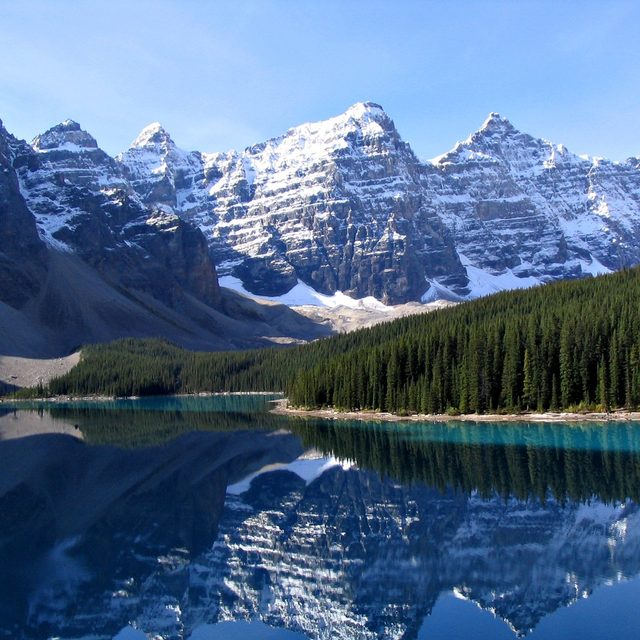

For this photo our tool wrote, as sentences: A stunning view of a lake surrounded by snow-capped mountains, with trees in the foreground and a clear blue sky in the background. Cool tones, pale blue and dark teal colors. As keywords: a mountain range is reflected in the water of a lake, cool tones, pale blue and dark teal colors. As anime-style tags: scenery, outdoors, no humans, mountain, sky, day, blue sky, water, reflection, landscape, cloud, nature, lake, river, building, tree. Note that the tags are only suggestions: "river" and "building" do not look right for this picture. Delete tags and phrases that do not match before you use them.
Ask for the right size
A generator draws best at the sizes it was trained on, and a wrong shape often gives odd crops or doubled subjects. For a picture with a given shape:
- Stable Diffusion 1.5: around 512 × 512 pixels in area (for example 640 × 384 for a 3:2 picture). Larger sizes tend to repeat the subject.
- Stable Diffusion XL: one of its nine training sizes: 1024 × 1024, 1152 × 896, 896 × 1152, 1216 × 832, 832 × 1216, 1344 × 768, 768 × 1344, 1536 × 640 or 640 × 1536.
- DALL·E 3: 1024 × 1024, 1792 × 1024 or 1024 × 1792.
- Midjourney: add
--arand a ratio at the end, for example--ar 3:2or--ar 16:9. - Stable Diffusion 3 and Flux: about one megapixel with sides in multiples of 64 is a safe choice.
The tool works out all of these from the shape of your picture.
Negative prompts
Stable Diffusion front ends have a second box for things to avoid ("blurry, low quality, watermark, text, signature"). Midjourney takes --no followed by words. DALL·E 3 has no negative prompt, and some newer models give them little or no effect. A short, general list is a starting point, not a recipe; it does not come from your picture.
What a prompt cannot do
- It cannot give you the same picture. A prompt is a description. Words cannot carry the exact face, light or brushwork, and a generator makes a new picture each time.
- The description may be wrong. A small model can misplace objects, invent details and read an outfit or an age wrongly. Check every line against the picture. In our tests it put a lighthouse on top of a fence that was in front of it.
- It does not name an art style. Describe the look in plain words (soft brush strokes, flat colors, thick outlines) rather than the name of a living artist, whose work you would be trying to copy.
- Other people's pictures. Describing a picture you did not make to generate a close copy can still be a copy of someone's work. Use it for inspiration, and change what you make.
- Pictures of real people. A description of a person's looks can be wrong and should not be used to identify them or to make pictures that pass as them.
A quick routine
- Look in the file's metadata first. If a prompt is there, use it.
- Make a description with Image to Prompt, choose the layout for your generator, and the kind of picture you want.
- Read it against the picture and cut what is wrong. Add anything important it missed: a person's pose, an object's color.
- Ask for the size from the table, generate a few pictures, and change one thing at a time.
Describe a picture as a prompt for Midjourney, Stable Diffusion, Flux or DALL·E: sentences, keywords or anime tags, with the tone, colors and the size to ask for. It runs in your browser. Open the Image to Prompt.
Frequently asked questions
Can I get the exact prompt that made an image?
Only if it was saved inside the file. Stable Diffusion and ComfyUI often save it; many websites remove it when you upload. Check the file in the metadata viewer. A prompt written from the pixels is a description, not the original.
Will the prompt give me the same picture?
No. It will give you a picture with a similar subject and mood. The exact details change every time because a generator makes a new picture from the words and a random seed.
Which format is best: sentences, keywords or tags?
Sentences for Midjourney, DALL·E 3, Flux and Stable Diffusion 3. Short phrases for Stable Diffusion 1.5 and XL. Danbooru tags for anime checkpoints trained on tags. If one gives poor results, try the next.
How long should a prompt be?
Long enough to cover the subject, setting, kind of picture, light and mood, and no longer. Stable Diffusion 1.x reads about 75 tokens at a time, so shorter is better there; sentence-based generators handle a paragraph.
Should I put an artist's name in the prompt?
We recommend describing the look in words instead. Using a living artist's name asks the generator to imitate their work, and many artists object.