How to turn a picture into a prompt
- Add a picture. Drop it anywhere on the page, paste it, or click the box to choose a file. A phone photo, including iPhone HEIC, works too. The shape, the tone and the main colors appear at once.
- Choose what you want. The length of the description, the kind of picture to ask for (a photo, an oil painting, anime, a 3D render...), and whether to add tone words, color words, quality words or a negative prompt. Tick Also tag the picture for anime models if the generator you use is trained on tags.
- Press Make the prompt. The first time, the page downloads the description model (about 343 MB on a graphics chip, 265 MB on a processor) and your browser keeps it.
- Pick a layout, edit, copy. The prompt is in a box you can change. Changing a setting rewrites the text, so make your own edits last.
Your original file is never changed. Everything the page makes is text.
The four layouts
| Layout | For | What is in it |
|---|---|---|
| Sentences | Midjourney, DALL·E 3, Flux, Stable Diffusion 3: generators that read whole sentences | The description at the length you chose, then the tone and color words. |
| Keywords | Stable Diffusion 1.5 and XL, which like short phrases separated by commas | The short description and the tone and color words, as a comma-separated list. Stable Diffusion 1.x reads about 75 tokens (roughly 55 words) at a time, and the page warns when the list is longer. |
| Anime tags | Models trained on Danbooru tags (many anime checkpoints) | The general tags the WD14 tagger gives the picture at 35% or more, up to 30, with spaces and escaped brackets. No rating and no character names. |
| Midjourney | Midjourney | One sentence (two for Long), the tone, and --ar with the shape of your picture, for example --ar 3:2. |
A worked example
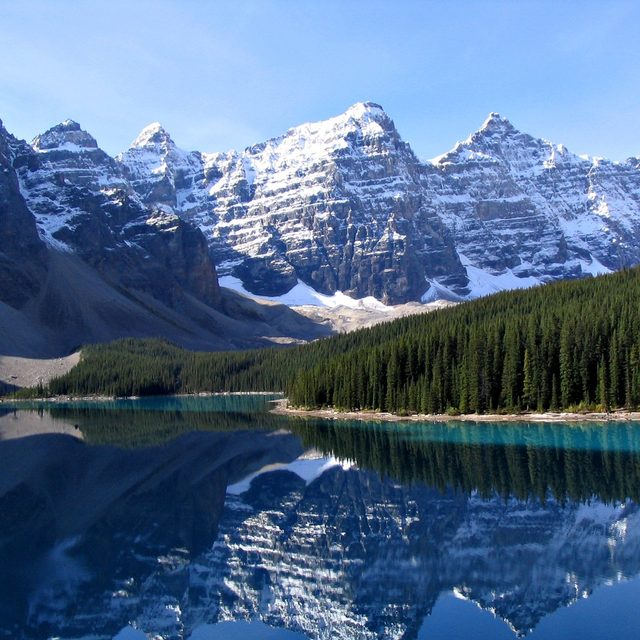

| Layout | What the page wrote |
|---|---|
| Sentences | A stunning view of a lake surrounded by snow-capped mountains, with trees in the foreground and a clear blue sky in the background. Cool tones, pale blue and dark teal colors. |
| Keywords | a mountain range is reflected in the water of a lake, cool tones, pale blue and dark teal colors |
| Anime tags | scenery, outdoors, no humans, mountain, sky, day, blue sky, water, reflection, landscape, cloud, nature, lake, river, building, tree |
| Midjourney | A stunning view of a lake surrounded by snow-capped mountains, with trees in the foreground and a clear blue sky in the background, cool tones, pale blue and dark teal colors --ar 1:1 |
Choosing Oil painting turns the first sentence into “An oil painting of a stunning view of a lake...”, and the keywords begin with “oil painting” and end with “visible brush strokes”. Those words are what you asked for, not something the page saw in the picture.
Where each part comes from
- The description is written by Florence-2 base (Microsoft, MIT license), the same model as our Image Caption Generator. It writes a short, a detailed and a very detailed description in one pass over the picture. The opening “The image shows” is taken off, and optionally the sentences that only say how the picture feels (“The overall mood is peaceful and serene”, “...creating a sense of depth”) are cut. On the detailed and very detailed descriptions of our 88 test pictures that removed 58 of 698 sentences and shortened 88 more, 12% of the words in all, and it never drops the first sentence.
- The tone and the colors are measured from the pixels, with no model (see below).
- The anime tags come from the WD14 ConvNeXt V2 tagger (SmilingWolf, Apache-2.0), the same file the Batch WD14 Tagger uses, so a visitor who has used it does not download it again.
- The sizes are worked out from the shape of your picture.
What the page measures itself
These words come from plain maths on a 192-pixel copy of the picture, so they are the same every time, and we checked the numbers against an independent Python version on real pictures (they agree to better than 12 decimal places).
| Word | When it is added |
|---|---|
| black and white | At least 97% of the pixels have their red, green and blue within 12 levels (of 255) of each other. No color words are added then. |
| warm tones / cool tones | On average red is at least 10% of the full scale above blue (warm), or below it (cool). |
| muted colors / vivid colors | The average color strength (saturation) is at most 0.18, or at least 0.55. |
| low-key lighting / high-key lighting | The average brightness is under 0.28, or over 0.68. |
| high contrast / soft contrast | The gap between the darkest 5% and the brightest 5% of the pixels is at least 0.80, or at most 0.35. |
| color words | The main colors of the picture, found by clustering in the Lab color space, up to three, each at least 10% of the picture, named plainly: black, white, gray, red, orange, yellow, green, teal, blue, purple, pink, magenta, brown, beige, with dark, pale or muted in front when clearly so. Two shades of one color (pale blue, dark blue) count once. |
The limits are our own choices, so treat the words as suggestions. On 87 test pictures: all 12 pencil sketches were called black and white, and of 30 photographs only two were (a 1940 photo of a street-corner restaurant and a pair of black headphones on white; an old sepia-toned photo of a street was called muted instead); two of four old paintings with dark backgrounds were called low-key (the Girl with a Pearl Earring and a portrait of a woman from the Metropolitan Museum); and 10 of the 87 got no tone word because nothing stood out. If a word does not suit your picture, untick Tone words.
The size to ask for
The table under the prompt gives the size nearest the shape of your picture for each generator:
- Stable Diffusion 1.5: about 512 × 512 pixels in area, with sides in multiples of 64.
- Stable Diffusion XL: one of the nine sizes it was trained on (1024 × 1024, 1152 × 896, 896 × 1152, 1216 × 832, 832 × 1216, 1344 × 768, 768 × 1344, 1536 × 640, 640 × 1536).
- Stable Diffusion 3, Flux and others at about 1 megapixel: a size of about a million pixels with sides in multiples of 64.
- DALL·E 3: one of its three sizes (1024 × 1024, 1792 × 1024, 1024 × 1792).
- Midjourney:
--arwith the smallest whole numbers (up to 21) within 1% of the picture's shape: 3:2, 16:9, 4:3.
A very wide or very tall picture gets the nearest size, which is a different shape: a 5:1 banner gets 1536 × 640 from SDXL, the widest it was trained on.
What it cannot do, and where it goes wrong
- It cannot recover the prompt a picture was made with. It looks at the pixels and writes what it sees. A different generator, a different seed or even the same words will give you a different picture. Use the prompt as a starting point and change it.
- If the picture was made with Stable Diffusion, ComfyUI or a similar tool, the real prompt may be inside the file. Check first with the Image Metadata Viewer and read our guide on reading the prompt from a Stable Diffusion image.
- The description makes mistakes. In our tests it placed a lighthouse “atop a wooden fence” when the fence is in front of it, and the very detailed captions often add names and details (a species of bird, a model of car) that cannot be checked from the picture. Read every description against the picture before you use it.
- It does not name an art style or an artist. We tried a classifier (CLIP) to guess the style. On 88 pictures (photographs, old paintings, anime art, and pencil, cartoon and comic versions of photographs made by our own tools) it named the right family (photo, painting, drawing, illustration) for fewer than half, so the page does not guess: you choose the kind of picture you want.
- The anime tags come from a tagger trained on anime pictures. On photographs they are often right (a lake gets “mountain, sky, water, reflection”) and sometimes odd: a red-roofed lighthouse tower was given “scarlet devil mansion”, and fishing boats were given “military vehicle” and “warship”. Delete any tag that does not fit.
- We did not run the prompts through image generators for this page. The layouts follow the conventions of each family of generators; try them and adjust.
- Pictures of people. The description may name an age, a pose or clothing, and it can be wrong. Do not use it to identify anyone.
Speed and downloads
| Graphics chip (WebGPU) | Processor | |
|---|---|---|
| Description model, download once | about 343 MB | about 265 MB |
| Description of one picture | about 2.5 seconds (1.8 to 3.5 over 88 pictures) | about 20 seconds |
| Anime tags, download once | about 388 MB, shared with the tagger pages | |
| Anime tags for one picture | 3.5 to 4 seconds | |
Times are from our test computer, a Mac laptop, in Chrome. The tone, colors and sizes take no time. A picture is sent to the description model at 768 pixels on its longest side, so a tiny object in a large photo can be missed. If the graphics chip fails, the page switches to the processor by itself and says so.
Where the work happens
- Everything runs inside this tab. The page downloads the models from Hugging Face the first time you use them: Florence-2 base (MIT), and for anime tags the WD14 ConvNeXt V2 tagger (Apache-2.0). See Credits. Your file on disk is never changed or deleted.
- For what this site collects and keeps, see our privacy policy.
Frequently asked questions
How do I turn an image into a prompt?
Add the picture, press Make the prompt, choose the layout that suits your generator (sentences, keywords, anime tags or Midjourney), edit the text and copy it. The page describes what is in the picture and adds its tone, colors and the size to ask for.
Will the prompt give me the same picture back?
No. It describes what is in the picture, but a generator turns words into a new picture each time, and the words cannot carry everything about the original (the exact faces, the exact light, the style of the hand that drew it). Treat it as a starting point and change it.
Can it tell me the prompt that was used to make an AI picture?
No: it only looks at the pixels. But the real prompt is often saved inside the file by Stable Diffusion and ComfyUI. Open the picture in the Image Metadata Viewer; our guide shows where it is and why it goes missing.
Which layout should I use for Midjourney, Stable Diffusion or Flux?
Midjourney: the Midjourney layout (it ends with --ar). Flux and Stable Diffusion 3: Sentences. Stable Diffusion 1.5 and XL: Keywords, or Anime tags for anime checkpoints. They are conventions, not rules: if one gives poor results, try another.
What size should I ask for?
The table under the prompt gives one for each generator, nearest to the shape of your picture: for example 1216 × 832 for a 3:2 picture in Stable Diffusion XL, 1792 × 1024 in DALL·E 3, and --ar 3:2 in Midjourney.
Why does the description get details wrong?
The model is small (Florence-2 base has 0.23 billion parameters) and it writes the most likely description, not a checked one. It can misplace objects, invent names and count wrongly, more so in the very detailed length. Read it against your picture.
Why are some anime tags strange for a photo?
The tagger was trained on anime and illustrated pictures. It does well on drawn pictures and often on landscapes, but a photo can get a tag from a drawing it resembles. Delete tags that do not fit.
Does it use my picture to train anything?
No: the models run in your browser tab and are not changed by your picture. For what the site collects and keeps, see our privacy policy.